Fred NXT Office 07 2017 (14 June 2017)
Release Notes
What is new in Fred NXT Office?
Customer statements - Payments with BPAY
BPAY is now available to customers as a method of payment to settle customer accounts.
Once BPAY is configured, stores can issue customer payments with the BPAY Biller code and Customer Reference Number.

BPAY is configured by your Head Office. See Configure BPAY for customer accounts
Counting Journals - Stocktake Variance report
A new printable stocktake variance report is available from the Counting Journals screen. This report is used to validate the results of a stocktake, by comparing the counted stock and the expected SOH.
Generate the Stocktake Variance report
- From Counting Journals, select the journals you want to report on.
You can report on Open or Committed journals.
For best results, it is recommended to select Committed journals.
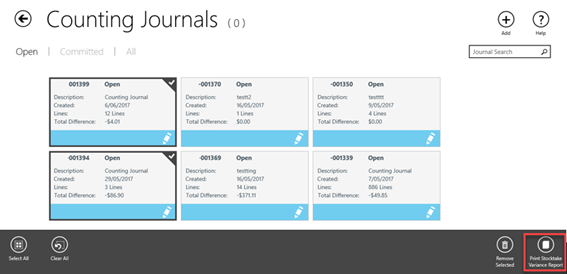
- Tap Print Stocktake variance report (in the footer of the Counting Journals screen).
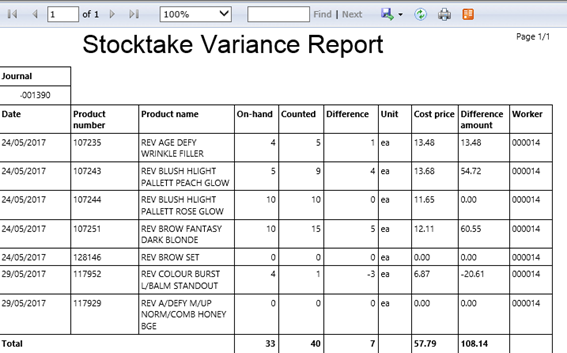
The report opens in a browser window. Multiple journals can be selected and printed in the same report, as required
The Stocktake Variance report displays breakdown of all counted items in the journal, with the variance Qty and variance $ value.
The calculation of the On Hand value is aligned throughout Fred NXT and the same On Hand value displays when searching for a product in Fred NXT Mobility, Fred Dispense Plus and Fred NXT POS.
See . This report can also be generated by your Head Office.
Counting Journals - On-Hand and counted values
The information displayed on the Counting Journals tiles and in the counting list report has been updated to reflect the changes in the calculation of the Counted and On-hand values.
From Fred NXT Office 06 2017 (22 May 2017), the On hand value displayed on each product tile represents the available Qty of a product.
If starting a counting journal during trading hours, On Hand takes into account any Qty that may have been dispensed, sold at the POS, or received on this day prior to creating the counting journal.
Once products are counted and the batch is committed, the On Hand value is updated.
The calculation of the On Hand value is aligned throughout Fred NXT and the same On Hand value displays when searching for a product in Fred NXT Mobility, Fred Dispense Plus and Fred NXT POS.
What is fixed in Fred NXT Office?
Daily Totals report - Customer count
The customer count in the Daily totals report is now correct.
See Store reports.
Purchase Orders - Print functionality
In Purchase Orders, printing a purchase order from the tile popup no longer causes Fred NXT Office to crash. The performance of the printing functionality has been improved to ensure printing no longer results in a memory usage overload.
When printing a purchase order, the reports opens in a new browser window, as expected.
 Search Tips
 Fred Learning Pathways