Fred NXT Office 05 2017 (4 April 2017)
Release Notes
What is new in Fred NXT Office?
Reports - New tile
A new Reports tiles has been added to Fred NXT Office dashboard. It provide quick access to 10 store reports.

Tap each tile to open a report in your browser and set the required reporting parameters.
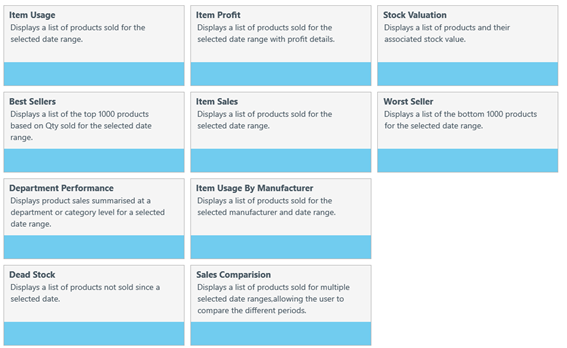
The View Reports link (located on the homepage of Fred NXT Office) has been removed.
These reports are described in details in Store reports.
Invoices - Create returns after committing unbalanced invoices
In Invoices, the dialog prompt displayed after attempting to commit an invoice containing un-received Qtys has been modified.
It displays only the Create Return option. The option to Receive all has been removed.

By default, Create return is set against each line. A receipt for the Difference quantity is posted and a return order is created in the Returns app. It is pre-filled with the product's details.
- Tap Cancel to return to the grid and continue receiving (including Receive All).
— or —
- Tap OK to close to create the return(s) and close the dialog prompt.
Invoices - Tile flyout displays additional product details
In the Invoice grid, you can now tap  next to each line item to display additional product information in a tile flyout.
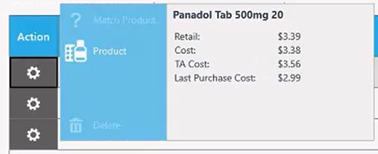
The left side of the flyout displays quick actions:
- Match Product: Tap to match this line item to an existing product.
- Product: Tap to open the Product card.
- Delete: Tap to remove this line from the invoice.
Invoices - Visual indicator for Committed queue
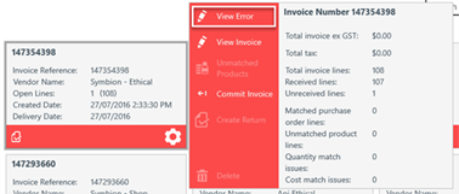
When an invoice is sent to the Commit queue, the invoice tile changes to orange to indicate the queue is in process. The message Commit Queued is visible on the flyout, and all options on the left side of the tile are disabled until the invoice is successfully committed and the tile colour is returned to blue.

If the invoice cannot be committed, the invoice tile is displayed in red. All tile options are enabled for manual intervention.
What is fixed in Fred NXT Office?
Customer statements - Auto hide cancelled transactions
In Customer statements, the Auto hide option now works as expected and excludes cancelled transactions.
A number of stores had reported that both sales and sale cancellations were still displayed on customer statement when Auto hide was enabled. This issue has now been resolved.
Store Reports - Item Usage report
In order to ensure the accuracy of the Item Usage Report, this report now uses the data sourced from Fred NXT Head Office, instead of Power BI.
Bulk Payments - Error message when payment fails
In, Fred NXT Office displays an error message to inform the user that the payment has failed.
Product card - Usage graph
The Monthly usage data displayed in products cards is now accurate. It matches the data displayed in the Item Usage report.
 Search Tips
 Fred Learning Pathways