Fred NXT Office 01 2017 (18 January 2017)
Release Notes
What is new in Fred NXT Office?
Statements - Auto hide
In , you can now toggle your Statements parameters to Auto hide.
When Auto hide is set, any Cancel or Edit action performed on autocharged scripts within the open statement period is automatically hidden:
- Cancelled scripts - Both the original and the credit are hidden. No visible line on the statement.
- Edited scripts – Both original and the reversal are hidden. Only the updated transaction is visible line on the statement.
This functionality only applies to autocharged scripts. It does not apply to Waiting scripts sent to autocharge from POS.
Electronic Transfers
The Transfer functionality allows you to set up another store within your Company as a Transfer customer for the purpose of transferring and invoicing stock to another store within your group.
Refer to for further details.
Commit invoices - Commit Queued and error flag
In , the Commit Invoice process is now a background process.
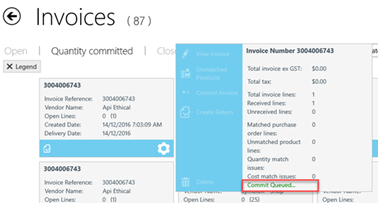
When you tap Commit Invoice, the selected invoices are now flagged as Commit Queued ....
All Commit options are disabled until the process is completed (in order to prevent any accidental re-committing).
If an error occurs during the Commit process, the invoice is displayed in red.
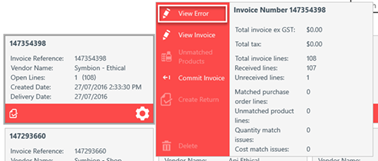
If the Commit process fails, Access support via your Fred Help Portal and provide the Invoice Number (visible of the flyout) and any available Error log.
Customer balance list report
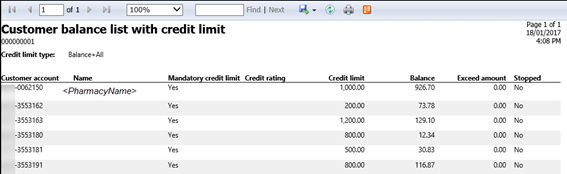
The Customer balance list with credit limit report provides a summary of accounts with outstanding amounts for a specified period.
This report is now available to stores from the Store reports It can also be accessed from the new Customer Balance List Report tile in the Customer group. Previously, this report was only available to Head Office.
- In the Customer group, tap the Customer Balance List Report tile.

- Tap to display the Customer Balance List Parameters.
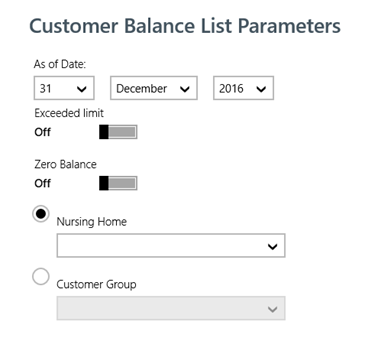
- Set the required As of Date.
- Select the relevant Nursing Home or Customer Group.
For example, Nursing, Staff, TAC, etc ...
- Tap
 Generate.
The report opens in a separate window. It can be printed or saved locally (as .pdf).
Queue Label
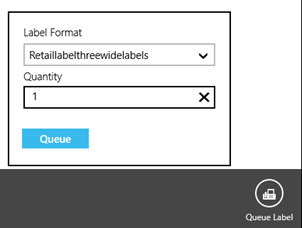
In, you can now add a product to a label queue even if no Product label or Shelf label template is set against it.
When selecting one or multiple product to sent to Queue Label, Fred NXT Office now detects if the template is missing. The Queue Label button is disabled until a Label Format is selected.
 Search Tips
 Fred Learning Pathways