After you Register for AusDI, you can change your AusDI integration settings in Fred Dispense whenever necessary.
-
From the Setup menu, select AusDI Configuration.
The AusDI Configuration Window is displayed.
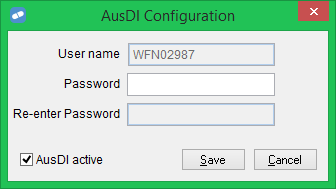
- Make the required changes. You can:
- Update your Password if you have changed it.
- Check or uncheck the AusDI active checkbox. This controls whether the option to request drug information from AusDI is shown on the Drug Information Request screen. For details, see Request Drug Information from AusDI.
- To save your changes and close the window, click Save.