Products
Drugs that are no longer required can be hidden from the Drug Search screen in Fred Dispense Plus. This is done by setting up a Hidden Drugs supplemental hierarchy and pushing it to the stores.
 Create the hidden drugs supplemental hierarchy
- Go to FredNXT Head Office > Merchandising > Category hierarchies and click Supplemental retail hierarchies.
- In the Supplemental retail hierarchies screen, click Category hierarchy New to create a new category hierarchy.
- Name it Hidden drugs (for easy identification), then Create.
- In the Category hierarchy screen, click New category node and call it Hidden drugs as well.
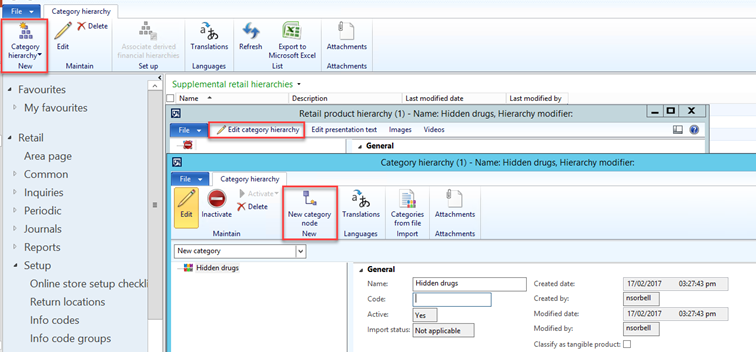
- Add a Code and a Friendly name.
- Close to save your changes.
You can create more than one hidden drugs hierarchies to suit the requirements of specific stores.
Enable the Hidden drugs for the store(s)
- Return to the FredNXT Head Office, and go to Common > Retails channels and click Retail stores.
- Select a store and click Edit.
- In the Store record, set the Hidden products hierarchy to the relevant hidden drugs hierarchy.
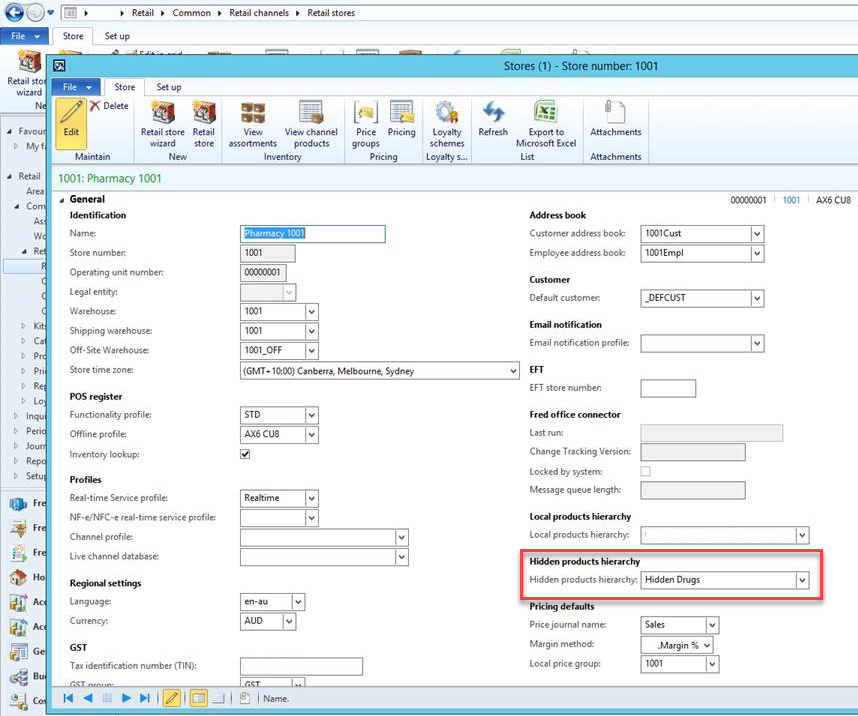
- Set every store with the required hidden products hierarchy if required.
This field can be blank for stores that are not using this feature.
Add products to the hierarchy manually
To quickly assort drugs to the Hidden drugs supplemental hierarchy, use DIEF and GroupsHierarchies.xlsx
- Go to the Product information management Area page > Common and click Released products.
- Perform a wildcard (*) search in Product name.
- Select the relevant search results in the grid and click Product categories (in the ribbon)
- Assign your selection to the Hidden drugs Category hierarchy and Category.
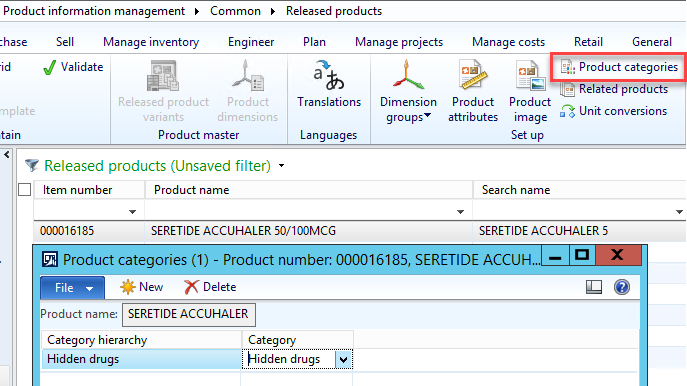
- Repeat as required.
- When complete, run Push jobs 1070,1040 and 1100 to push the hierarchy to the stores.
 Fred Learning Pathways