Batch reports
 Banking Consolidation
Summary of report
Shows Cash and Cheque Tender values for Bank Total by Register.
Requires that Batch Entry information for range of batches be completed.
Detail only appear if the reconciliation of batches has been done at Batch Entry.
Use for: Check Banking Details against Actual Bank.
Column Definitions
| Column Heading | Definition/Calculation | Group by | Add from Column Chooser |
|---|---|---|---|
| Batch Number | The batch created at the register (Batch Number) | ||
| Cash | The value of the tender “cash” for the Batch | ||
| Cheque | The value for the tender “cheque” for the Batch | ||
| Closed Date | The date the register batch was closed | Y | |
| Register | The register this batch was from | ||
| Total Bank | Sum of the value of Cash and value of Cheque tenders |
Batch Details
Summary of report
Displays all the details included in a “batch” at the register.
Displays for all batches.
Use for:
-
To monitor over/shorts recorded when closing batches.
-
To monitor number of batches created in a day.
-
To monitor type of transactions prevalent a specific register.
-
To monitor traffic at specific registers.
-
To monitor paid outs / drops / no sales / aborted transactions / discounts given.
-
To monitor transaction types generally at registers (laybys, account sales, account payments).
-
To monitor returns thought the registers.
Column Definitions
| Column Heading | Definition/Calculation | Group by | Add from Column Chooser |
|---|---|---|---|
| Aborted Transactions | Number of aborted transactions in the Batch | Y | |
| Acct Payments | Value of payments made to account through the register for the Batch. (does not include payments made through the back office) | ||
| Acct Sales | Reports the value of account sales (included in Sales ex) | ||
| Actual Total | (Opening Total - Closing Total) | Y | |
| Batch | The batch created at the register (Batch Number) | ||
| Batch Date | The date the register batch was closed (can be Open or Closed date) | Y | |
| Closing Total | Closing balance in the till | Y | |
| Comments | Written comments added to the Batch entry screen when reconciling the Batch | Y | |
| Cost of Goods | Value of the items sold (Cost ex) | Y | |
| Customer Count | Number of transactions in the Batch | Y | |
| Deposit Redeemed | Value of deposits paid back to customers in this Batch | Y | |
| Deposits Recd. | Value of deposits taken in this batch | Y | |
| Difference | (Closing Total– Actual Total) | ||
| Discounts | Value of discounts applied in batch | Y | |
| Dropped | Value of monies removed from the register and recorded as ‘drops” at the register for this Batch | Y | |
| Gov Recov | Estimated value of Govt recovery attributable to Scripts “sold” | Y | |
| Items Sold | Count of items included in all transactions within the Batch | Y | |
| Layby Payments | Value of Payments made against open laybys in this Batch | Y | |
| Layby Sales | Value of completed laybys in this Batch | Y | |
| Margin % | ((Sales Ex. - Returns + Gov Recov) - Cost of Goods)) / (Sales Ex. - Returns + Gov Recov) x 100 | ||
| No Sales | Count of “No Sale” actions at the register in this Batch | Y | |
| Opening Total | Opening balance in the till (if wanting to record the float) | Y | |
| Paid Out | Value of Paid Outs made at the register in this Batch | Y | |
| Profit | ((Sales Ex. - Returns + Gov Recov) - Cost of Goods) | ||
| Register | The register this batch was from | Y | |
| Returns | Value of returns done at the register for the Batch | ||
| Sales Ex. | Sales for all tenders (including “by account”) ex GST recorded through the register (and, if this is the “auto-charge” register, including scripts charged direct to account for the Batch). This value has not had "returns” deducted | ||
| Script Qty Sold | Count of scripts sold in this batch via this register | Y | |
| Script Value Sold | Value of prescription items sold in this batch via this register | Y | |
| Tax | Value of GST collected (This will include GST from Dr Bag, <alt><G> and <?> dispensing) | ||
| Total Sales | (Sales Ex. – Returns + Tax) where Sales ex includes account sales |
Batch Tender Summary
Summary of report
Displays breakdown of batches by tender type for each register
Displays for all batches.
Use for
-
To monitor tenders used by register.
-
To be able to drill down to individual transactions by tender type.
Column Definitions
| Column Heading | Definition/Calculation | Group by | Add from Column Chooser |
|---|---|---|---|
| % of tender Total | %age that the tender total for any tender type is of the total of all tenders for this Batch | ||
| Batch Number | The batch created at the register (Batch Number) | Y | |
| Closed Date | The date the register batch was closed | Y | |
| Register | The register this batch was from | Y | |
| Tender Count | Sum of transactions for the Tender Type | ||
| Tender total | Sum of all the amounts received through the register in this batch | ||
| Tender Type | Specifies the tender type (cash; cheque; by account; Eftpos etc) for this transaction in the batch |
Batch Tender/Transaction Details
Summary of report
Displays tender information used by transaction, batch & register
Only displays data for Closed batches.
Use for:
-
To monitor tender used for specific transactions.
-
To track if accounts have been charged correctly (and scripts not send to the register).
Column Definitions
| Column Heading | Definition/Calculation | Group by | Add from Column Chooser |
|---|---|---|---|
| Account Name | Identifier of specific account if included in transaction | ||
| Account Number | Identifier of specific account if included in transaction (Account Number) | ||
| Batch Number | The batch created at the register (Batch Number) | Y | |
| CRN | Customer Reference Number | ||
| Margin % | ((Sales Ex + Gov Recov) - Cost Ex)) / (Sales Ex + Gov Recov) x 100 | ||
| Profit | (Sales Ex + Gov Recov) - Cost Ex | ||
| Register | The register this batch was from | Y | |
| Tender Amount | Value of the transaction | ||
| Tender Type | Specifies the tender type (cash; cheque; by account; Eftpos etc) for this transaction in the batch | Y | |
| Transaction Number | Identifier for specific transaction (Transaction Number) | ||
| Transaction Type | Identifies the transaction as a sale, payment etc. |
Daily Tax Summary
Summary of report
Displays summary of Batch Sales as Taxable or Non-Taxable Sales
Only displays data for Closed batches.
Use for:
-
To monitor GST generated via the Dispensary.
-
To monitor levels of Taxable/Non-Taxable sales over a time period.
Column Definitions
| Column Heading | Definition/Calculation | Group by | Add from Column Chooser |
|---|---|---|---|
| % Non-Taxable Sales | ((Non-Taxable Sales/ (Total Sales Inc - Tax) x 100) | ||
| % Taxable Sales | ((Taxable Sales Inc - Tax) / Total Sales Ex) x 100) | ||
| Batch Date | The date the register batch was closed (can be Open or Closed date) | Y | |
| Batch Number | The batch created at the register (Batch Number) | ||
| Dispensary GST | Value of GST attributable to Dispensed items | Y | |
| Non-Taxable Sales | Sum of all sales where tax is not included in the price | ||
| Register | The register this batch was from | Y | |
| Tax | Value of GST collected | ||
| Taxable Sales Ex | Sum of all sales exclusive of Tax | ||
| Taxable Sales Inc | Sum of all sales including Tax | ||
| Total Sales Inc | (Taxable sales Inc + Non-Taxable Sales) |
Efficiency of Sales
Summary of report
Displays calculated measure of efficiency thought the registers
Only displays data for Closed batches.
-
To monitor “basket" value (avg sales $ per transaction)
-
To monitor “basket” profitability (average profit per transaction)
-
To monitor number of lines sold per transaction
-
To monitor %age of transaction which include script items
-
To monitor %age script of total sales
-
To monitor %age single item sales of all transactions
-
To monitor average profit per item sold
-
To monitor average sales $ per item
-
To monitor average number of items per transaction
-
To report all the above per individual cashier
Column Definitions
| Column Heading | Definition/Calculation | Group by | Add from Column Chooser |
|---|---|---|---|
| % of Single Item Sales | (Transaction count where only one item is included in the transaction / Total Transaction Count) x 100 | ||
| %Customers with Rx | (Customer (transaction) count where at least one Rx is included in the transaction in the period / Total Customer (transaction) count in the period) x 100 | ||
| Avg $ Profit per Item | (Total profit dollar in period) / Total items sold in the period | Y | |
| Avg $ Sale per Item | (Total sales $ ex tax) / Total items sold in period | Y | |
| Avg Items per Txn | Total Items sold in period/ total transactions in period | Y | |
| Avg Lines per Trans | Total lines sold in period/Transaction (customer) Count in period | ||
| Avg Profit $ Per Trans ex | Sum of all Profit $ / Transaction Count for Batch | ||
| Avg Sales $ Per Trans ex | Sum of all Sales ex (excl Govt Recovery) / Transaction Count for Batch | ||
| Batch Number | The batch created at the register (Batch Number) | Y | |
| Cashier | Cashier details | Y | |
| Closed Date | The date the register batch was closed | Y | |
| Net Taxable Sales | Sum of all taxable sales (ex tax) in period | Y | |
| Register | The register this batch was from | Y | |
| Rx % of Total Sales | (Script value $ sold (ex tax) in period /total sales in period) x 100 | ||
| Sales Ex. | Sales for all tenders (including “by account”) ex GST recorded through the register (and, if this is the “auto-charge” register, including scripts charged direct to account for the Batch). This value has not had "returns” deducted | Y |
Itemised Transaction Details
Summary of report
Full details of transaction for any date range. Used to display drill down information from other batch reports
Only displays data for Closed batches.
-
To tack transaction in dispute
-
To provide transaction breakdown of cashier performance
-
To monitor transactional details of customer accounts
Column Definitions
| Column Heading | Definition/Calculation | Group by | Add from Column Chooser |
|---|---|---|---|
| Cashier First Name | Cashier First Name | Y | |
| Cashier Full Name | Cashier Full Name | Y | |
| Cashier Last Name | Cashier Last Name | Y | |
| Category | Departmental Category the item belongs to | Y | |
| Cost Ex | Unit cost of the item in a transaction | Y | |
| Customer First Name | Customer First Name | Y | |
| Customer Full Name | Customer Full Name | Y | |
| Customer Last Name | Customer Last Name | Y | |
| Department | Department the item belongs to | Y | |
| Disc $ | Value of Discount allowed per Item/Transaction | ||
| Ext Cost ex | (Unit Cost Ex of an item x Qty Sold) | ||
| Ext Retail | (Unit Retail x Qty Sold) | ||
| Gov Recov | Estimated value of Govt recovery attributable to Scripts “sold” | ||
| Item Code | Item look-up code for item | ||
| Item Comments | Comments added to an item when sold at the register | Y | |
| Item Description | Detailed description of item | Y | |
| Margin % | ((Sales Ex + Gov Recov) - Cost Ex)) / (Sales Ex + Gov Recov) x 100 | (Sales - Returns + GovRec Est) - Cost of Goods | |
| Profit | (Sales Ex + Gov Recov) - Cost Ex | ||
| Qty Sold | Count of items in a transaction | ||
| Reference # | A reference number which can be attributed to the transaction at the register | Y | |
| Register | The register this batch was from | Y | |
| Sale Description | Detailed description of item | ||
| Sales Ex. | Sales for all tenders (including “by account”) ex GST recorded through the register (and, if this is the “auto-charge” register, including scripts charged direct to account for the Batch). This value has not had "returns” deducted | ||
| Script # | Script Number of script included in a Transaction | Y | |
| Tax | Value of GST collected | ||
| Tender Type | Specifies the tender type (cash; cheque; by account; Eftpos etc) for this transaction | ||
| Transaction | Identifier for specific transaction (Transaction Number) | Y | |
| Transaction Comment | Comments added to the Transaction when sold at the register | ||
| Transaction Date | Time and date of the Transaction | ||
| Transaction Reference | Reference added to the Transaction when sold at the register | ||
Reason Codes Report
Summary of report
Displays transaction details with reason codes from the Fred POS Plus.
Shows discount, return, and tax change reason codes along with item, cashier, and price source information.
Use for:
-
Reporting on reason codes for discounting, including which cashier applied the discount.
-
Tracking return reason codes and identify patterns in returns.
-
Monitoring tax change reason codes across transactions.
-
Analysing transactions sold as Loyalty or with specific price sources.
Column Definitions
| Column Heading | Definition/Calculation | Group by | Add from Column Chooser |
|---|---|---|---|
| Cashier | Name of the cashier who processed the transaction | ||
| Category | Departmental Category the item belongs to | Y | |
| Cost | Unit cost of the item in a transaction | ||
| Customer | Customer name linked to the transaction | Y | |
| Date Sold | Time and date of the Transaction | ||
| Department | Department the item belongs to | Y | |
| Disc. $ | Value of Discount allowed per Item/Transaction | ||
| Discount Code | Short code linked to the discount reason | Y | |
| Discount Reason | Description of the discount reason applied to the transaction line. | ||
| Item Code | Item look-up code for item | ||
| Item Description | Detailed description of item | ||
| Price Source | Indicates how the price was determined (e.g. Regular price, sale price, discount type | Y | |
| Qty Sold | Count of items in a transaction | ||
| Register | The register this batch was from | Y | |
| Return Code | Short code linked to the return reason | Y | |
| Return Reason | Description explaining why an item was returned. | ||
| Sold Price | Price the item was actually sold for (after discounts) per unit. | ||
| Tax Change Code | Short code for tax change reason | ||
| Tax Change Reason | Description explaining why tax was modified on the transaction. | Y | |
| Total Sales | Total value of the transaction line (Price × Quantity). | ||
| Transaction | Unique POS transaction number |
Sales Banking Details
Summary of report
Displays banking & tax information for each closed batch in a predetermined format
Used to display expected banking results in the event that the batch entry and end of day functions are not utilised
Will give estimate of tax and estimate of banking information based on sales data from a register
Use for
-
Local expected tax collected for a given date range
-
Local banking information for cash up purposes
-
Basic information from registers that have been closed for a given period
Column Definitions
NIL
Column Calculation
| Column Heading | Definition/Calculation |
|---|---|
| Total 1 | Opening Total + Sales - Returns + Tax + Paid on Layby + Paid to Account + Deposit Made |
| Total 2 | Paid out + Dropped + Layby Closed + Charged on Account + Deposit Redeemed + Closing Total |
| Over / Short | Total 1 – Total 2 |
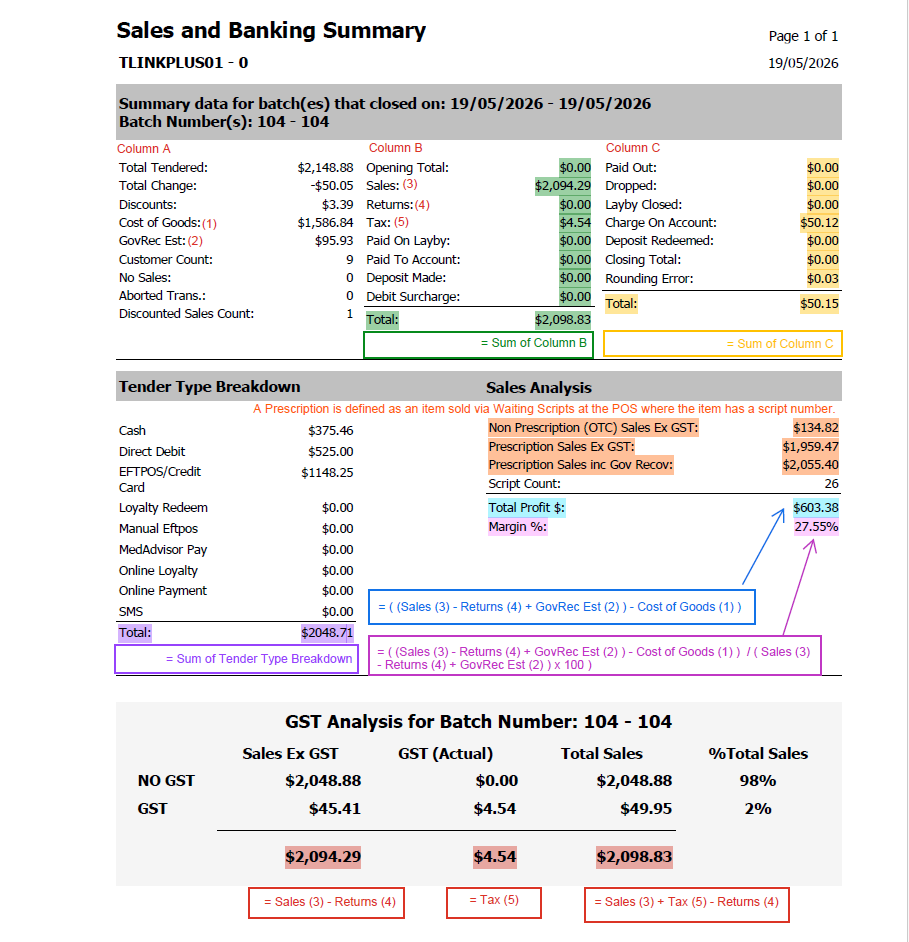
Sales and Banking Summary
Summary of report
Displays banking & tax information in a predetermined & summarised format
Used to display expected banking results in the event that the batch entry function are not utilised.
Will give estimate of tax and estimate of banking information based on sales data from a register
Use for:
-
Local expected tax collected for a given date range.
-
Local banking information for cash up purposes.
-
Basic information from registers that have been closed for a given period.
-
Tender Type Break down for a given date range.
Column Definitions
NIL
Column Calculation
| Section | Column Heading | Definition/Calculation |
|---|---|---|
| Summary Data | ||
| Total 1 | Opening Total + Sales - Returns + Tax + Paid on Layby + Paid to Account + Deposit Made +Debit Surcharge | |
| Total 2 | Paid out + Dropped + Layby Closed + Charged on Account + Deposit Redeemed + Closing Total + Rounding Error | |
| Tender Type Breakdown | ||
| Total | Sum of Listed tenders | |
| Sales Analysis | ||
| Non Prescription (OTC) Sales Ex GST | Items sold with a script number are classified as a Prescription Sale | |
| Prescription Sales Ex GST | ||
| Prescription Sales in Gov Recov | ||
| Script Count | Sum of Items sold with a script number | |
| Total Profit $ | (Sales - Returns + GovRec Est) - Cost of Goods | |
| Margin % | ((Sales - Returns + GovRec Est) - Cost of Goods)) / (Sales - Returns + GovRec Est) x 100 | |
| GST Analysis | ||
| Sales Ex GST Total | Sales - Returns | |
| GST (Actual) Total | Tax | |
| Total Sales Total | Sales + Tax - Returns |
Example report with an explanation on how the totals are calculated is shown below. You can also download a copy from the Related Resources below.
Scripts Charged Direct to Account
Summary of report
Displays all the items dispense and charged directly to account
Only displays data for Closed batches.
-
Shows the activity via the Auto charge register and the auto charge cashier
-
Identifies those prescriptions charged directly to account (not via the registers)
Column Definitions
| Column Heading | Definition/Calculation | Group by | Add from Column Chooser |
|---|---|---|---|
| Account # | Identifier of specific account if included in transaction (Account Number) | ||
| Account Name | Identifier of specific account if included in transaction | ||
| Account Type | Personal; TAC; Work Cover; Other | Y | |
| Batch Date | The date the register batch was closed (can be Open or Closed date) | Y | |
| Batch Number | The batch created at the register (Batch Number) | Y | |
| CRN | Customer Reference Number | ||
| Disc $ | Value of Discount allowed per Item/Transaction | ||
| Gov Recov | Estimated value of Govt recovery attributable to Scripts “sold” | Y | |
| Item Code | Item look-up code for item | ||
| Item Description | Detailed description of item | ||
| Item Qty | Count of items within the prescription | ||
| Sales Ex | Sales for all tenders (including “by account”) ex GST recorded through the register (and, if this is the “auto-charge” register, including scripts charged direct to account for the Batch). This value has not had "returns” deducted | ||
| Script # | Script Number of script included in a Transaction | ||
| Transaction # | Identifier for specific transaction (Transaction Number) | ||
| Transaction Date | Time and date of the Transaction | Y |