Any Event Summary document created by your pharmacy, and previously uploaded to the My Health Record, can be amended via Fred Dispense and the document will be superseded at the My Health Record.
If the patient has withdrawn consent for you to manage their allergy records, you will not be able to amend or remove an Event Summary created by your pharmacy.
- Search for and select the patient.
- Press [F8] to open the Patient Details screen.
- Select Allergies.
The Patient: Allergies & Conditions window is displayed. - Click My Health Record.
The Update My Health Record Step 1 of 2 window is displayed. The previously-created allergy event summary will not have a tick in the Update checkbox. The word Amend is displayed in the Change column.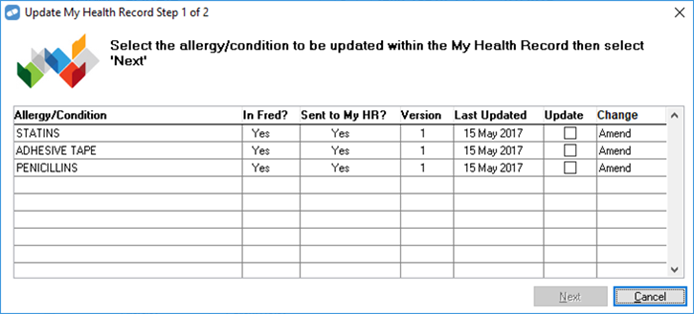
- Tick the Update checkbox for each allergy you want to amend.
- Click Next.
The Update My Health Record Step 2 of 2 window is displayed.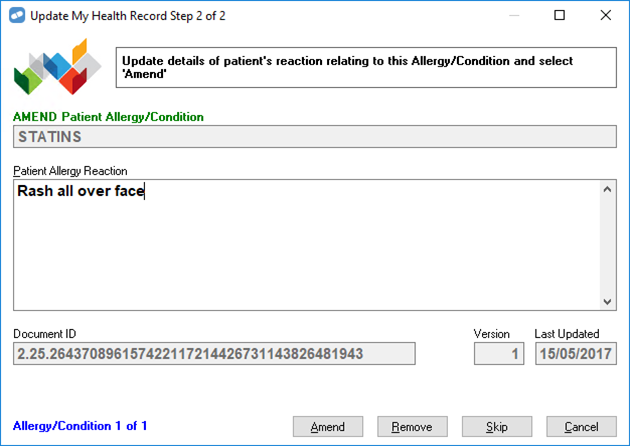
- Update the Patient Allergy Reaction field as required.
The Amend button is disabled until you update the Patient Allergy Reaction field.
- Click Amend.
An Uploading allergy to My Health Record dialog box is displayed. The event summary is sent through to the patient’s My Health Record, and supersedes the older event summary. - Once the event summary is uploaded, a success message is displayed.

- Press any key. If there are more allergies to amend, the Update My Health Record Step 2 of 2 window changes to show the next allergy.