Chemotherapy Drug Usage Report
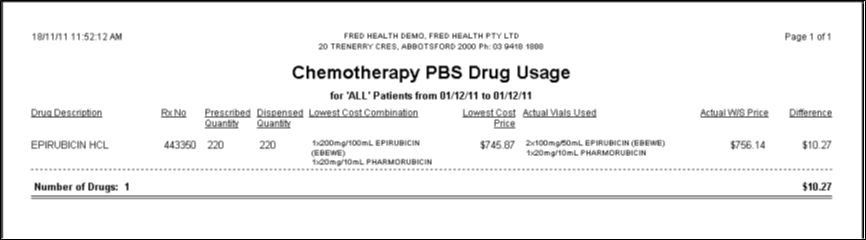
This report shows information about your chemotherapy scripts dispensed within a selected date range.
Report details
- Script number
- Prescribed quantity
- Dispensed quantity
- Lowest-cost combination of vials
- The price of the lowest-cost combination of vials
- The actual combination of vials dispensed
- The actual price of the dispensed combination
- The price difference between lowest-cost and dispensed combinations
Run the Chemotherapy Drug Usage report
- On the Fred Dispense screen, press [Alt+R], or click the Reports menu.
- Press [U], or click Drug Usage.
- Select Chemotherapy Drug Usage.
- The Chemotherapy PBS Drug Usage window is displayed.
- Enter the required details in the appropriate fields, then click Generate.